Laser247 deposit and withdrawal options are built around the payment methods Indian bettors actually use. UPI deposits land in your account in 1–3 minutes. UPI withdrawals process in as little as 30 minutes. No hidden fees on standard transactions, and no weekly withdrawal caps that force you to leave money on the platform.
This guide covers every supported payment method, exact processing times, step-by-step flows for both deposits and withdrawals, and how Laser247 stacks up against the rest of the market on payment speed.
Supported Deposit Methods
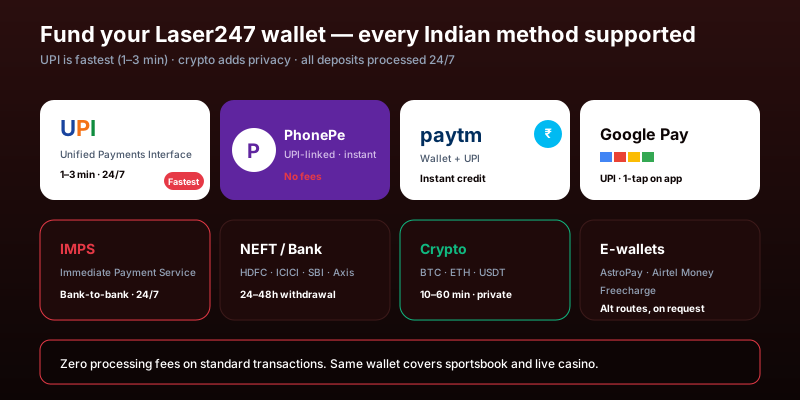
To understand the rails behind these deposits, see NPCI’s UPI product overview — the technical explainer for India’s instant payments system.
Laser247 accepts deposits through six channels. Each has different processing speeds and suits different situations.
UPI (GPay, PhonePe, Paytm)
The fastest and most popular option. Initiate a deposit, approve it in your UPI app, and funds appear in your Laser247 account within 1–3 minutes. On the Laser247 app, UPI deposits launch your payment app directly for one-tap authorization — no QR codes to scan or UPI IDs to type manually. Available 24/7 including weekends and holidays.
UPI is powered by the National Payments Corporation of India and settles transactions in near real-time, which is why it delivers the fastest deposit experience on the platform. For background on how the system works, see the NPCI’s UPI product overview.
IMPS
Immediate Payment Service transfers process in 1–5 minutes and are available around the clock. IMPS works through your bank’s mobile app or net banking portal and supports transfers up to ₹5 lakh per transaction at most banks. A solid alternative if you prefer direct bank transfers over UPI apps.
NEFT and Bank Transfer
Standard bank transfers take 30 minutes to 2 hours depending on your bank’s processing speed. Slower than UPI or IMPS, but NEFT supports larger transaction amounts and works through every bank in India. NEFT runs 24/7 following the RBI’s round-the-clock mandate, though processing at certain smaller banks may still batch during off-peak hours.
E-Wallets
Electronic wallet deposits process in 1–5 minutes. Useful if you maintain a dedicated balance for betting separate from your primary bank account. E-wallets add a layer of separation between your bank and the platform, which some bettors prefer for budgeting.
Cryptocurrency
Crypto deposits take 5–30 minutes depending on network congestion and confirmation requirements. Bitcoin (BTC), Ethereum (ETH), and USDT are supported. Cryptocurrency is not subject to banking hours or transfer limits, and offers an additional layer of privacy. Note that crypto values fluctuate, so your rupee-equivalent deposit amount may vary slightly between initiation and confirmation.
Supported Withdrawal Methods
Every deposit method doubles as a withdrawal method. Processing speeds vary.
UPI — the fastest cashout. Withdrawals to GPay, PhonePe, or Paytm process in instant to 30 minutes. Available 24/7. This speed is possible because UPI settles through NPCI’s real-time infrastructure.
IMPS — withdrawals take 1–4 hours. Direct to your bank account, available around the clock. Good for mid-range withdrawal amounts.
NEFT and bank transfer — processing takes 24–48 hours. Supports the largest withdrawal amounts and works universally across all banks. Larger withdrawals may require additional verification, adding time.
Cryptocurrency — crypto cashouts complete in 10–60 minutes depending on blockchain congestion. Useful for privacy and for bypassing traditional banking timelines.
E-wallets — withdrawals process in 2–6 hours. Handy for keeping a separate betting balance that you can redeposit later without routing through your bank.
| Method | Deposit Speed | Withdrawal Speed | Best For |
|---|---|---|---|
| UPI (GPay, PhonePe, Paytm) | 1–3 minutes | Instant to 30 min | Speed and convenience |
| IMPS | 1–5 minutes | 1–4 hours | Direct bank, larger amounts |
| NEFT / Bank Transfer | 30 min – 2 hours | 24–48 hours | Maximum transfer sizes |
| E-Wallets | 1–5 minutes | 2–6 hours | Separate betting balance |
| Cryptocurrency | 5–30 minutes | 10–60 minutes | Privacy, no bank limits |
How to Deposit — Step by Step
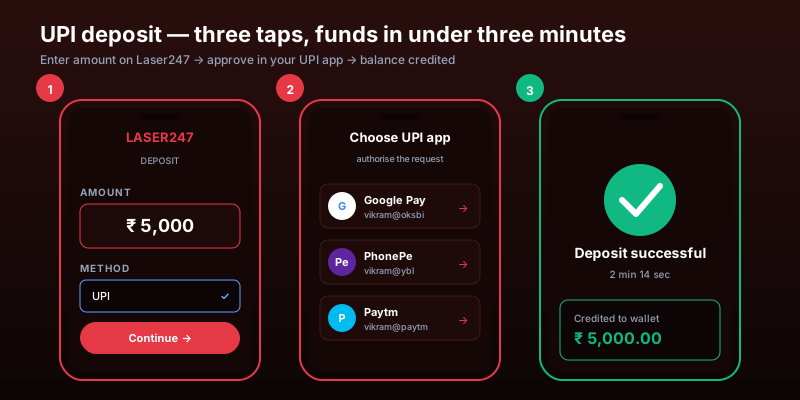
The deposit flow is the same regardless of method. Here is the UPI process since it is the most common.
Step 1 — Open the banking panel. Log in to your Laser247 account and tap the “Deposit” button in the top bar or account dashboard. All available methods are listed with their current processing times.
Step 2 — Select UPI. The platform shows the minimum and maximum for UPI deposits. If you have used UPI before on this account, your preferred app is pre-selected.
Step 3 — Enter the amount. Type your deposit amount. On the mobile app, you can save preferred amounts for one-tap future deposits.
Step 4 — Approve the payment. The app launches your UPI application (GPay, PhonePe, or Paytm) directly. Confirm the payment with your UPI PIN. On desktop, you may need to scan a QR code or enter the displayed UPI ID in your payment app.
Step 5 — Funds appear. Your updated balance shows within 1–3 minutes. You receive a push notification on the app or a WhatsApp confirmation when the deposit is credited.
For IMPS or bank transfers, the platform displays Laser247’s bank details after you select the method. Transfer the funds from your bank, then confirm the transaction reference in the deposit form.
How to Withdraw — Step by Step
Step 1 — Open the withdrawal panel. Tap “Withdraw” from your dashboard or the banking menu.
Step 2 — Choose your method. Select UPI, IMPS, NEFT, crypto, or e-wallet. For the fastest cashout, choose UPI.
Step 3 — Enter the details. Specify the amount and confirm your payment destination — UPI ID, bank account and IFSC, or crypto wallet address. The platform saves your details after the first successful withdrawal, so repeat cashouts are faster.
Step 4 — Confirm and submit. Review everything — amount, destination, estimated processing time, and any applicable notes. Confirm to submit.
Step 5 — Track it. Monitor the status in your transaction history. UPI withdrawals typically complete while you are still on the tracking screen. Bank transfers show “Processing” until the funds are dispatched. If a withdrawal takes longer than expected, customer support on WhatsApp can trace it in minutes.
Fees and Limits
Standard transactions carry no platform fees. Laser247 absorbs processing costs for UPI, IMPS, NEFT, and bank transfers. Your bank may charge its own fees for certain transfer types — check with your bank if you are unsure.
Cryptocurrency transactions involve blockchain network fees (gas fees for Ethereum, miner fees for Bitcoin). These are set by the network, not Laser247, and are displayed before you confirm.
No standard withdrawal caps. Unlike many competitors that impose daily or weekly withdrawal limits, Laser247 does not restrict how much you can withdraw under normal circumstances. Very large withdrawals — significantly above your typical transaction size — may trigger additional identity verification for security compliance, which can add 24–48 hours. Contact support in advance if you plan an unusually large cashout.
Minimum deposits are accessible for beginners. The exact minimum varies by method and is displayed when you select your payment channel. The minimums are set low enough to let new users explore the platform without a large initial commitment.
Payment Security
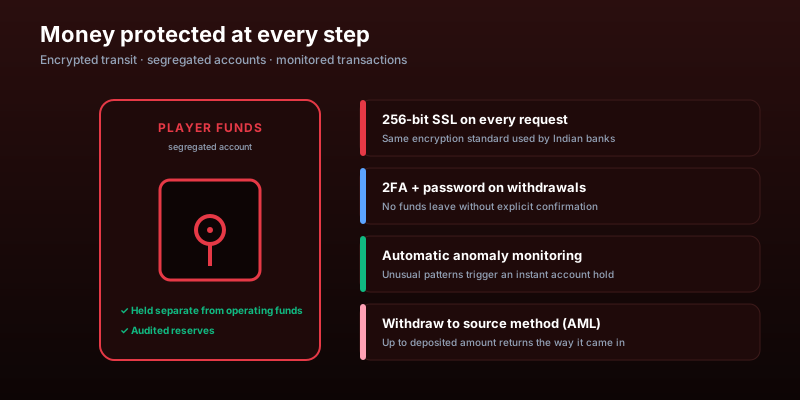
Every transaction on Laser247 is protected by multiple layers that mirror what major Indian banks use.
256-bit SSL encryption secures all financial data in transit. Your UPI ID, bank details, and transaction amounts cannot be intercepted between your device and Laser247’s servers.
Segregated funds. Laser247 holds player deposits in accounts separate from the company’s operating funds. Your balance is accessible for withdrawal regardless of the platform’s business operations.
Payment verification. Withdrawals require password confirmation and, if enabled, a two-factor authentication code. This prevents unauthorised cashouts even if someone accesses your active session.
Transaction monitoring. The platform flags unusual patterns — a sudden large withdrawal to a new destination, rapid deposit-withdrawal cycling, or activity outside your normal pattern. These checks add a short delay but protect against fraud. If you plan a legitimate large withdrawal to a new account, letting support know in advance smooths the process.
Common Payment Issues and How to Resolve Them
Most payment problems on Laser247 sort themselves out within minutes. Here are the situations bettors run into most often and what to do about each one.
Deposit debited from bank but not showing in Laser247. This usually means the payment is still being processed by the intermediary. UPI and IMPS deposits should appear within 5 minutes, NEFT within 2 hours. Do not initiate a second deposit — that creates confusion and may result in a double charge. If the timeframe passes without the balance updating, contact support on WhatsApp with your transaction reference number. Most missing deposits are traced and credited within 1–2 hours.
Withdrawal stuck in “Pending” status. Pending means the request has been received but not yet dispatched. UPI withdrawals rarely sit in pending for more than a few minutes. NEFT and bank transfers may show pending for several hours during processing. If a UPI withdrawal stays pending for more than 30 minutes or a bank transfer for more than 48 hours, flag it with support.
UPI payment app not launching on mobile. This happens when the Laser247 app cannot detect your installed UPI app. Close the Laser247 app, confirm your UPI app is updated and logged in, then retry. If the issue persists, switch to the QR code method — the platform displays a QR code you can scan from any UPI app manually.
Bank declined the transaction. Some banks flag betting-related transactions. If your deposit is declined, try a different payment method — switching from GPay to PhonePe often resolves this since the block may be app-specific rather than account-level. If all UPI apps are blocked, try IMPS or a direct bank transfer.
Withdrawal to wrong account. If you catch the error before the withdrawal enters “Processing,” cancel it immediately from your transaction history and resubmit with the correct details. If it has already been processed, contact support immediately. UPI transfers to non-existent IDs typically bounce back automatically. Bank transfers to incorrect accounts require manual tracing, which can take several business days.
Laser247 vs Competitors — Payment Speed
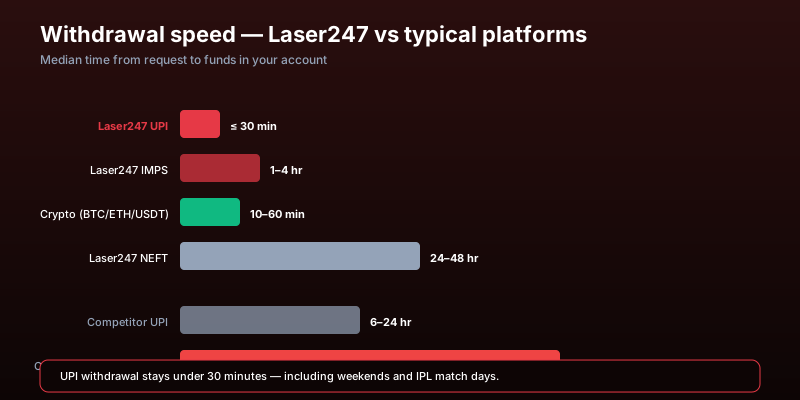
| Criteria | Laser247 | Typical Competitor |
|---|---|---|
| UPI withdrawal | Instant to 30 min | 12–24 hours |
| Bank transfer withdrawal | 24–48 hours | 48–72 hours |
| Standard withdrawal cap | No cap | Daily or weekly limits common |
| Hidden fees | None on standard methods | 1–3% withdrawal fee common |
| Crypto support | Deposits + withdrawals | Rarely offered |
| Weekend processing | Full speed, 24/7 | Often delayed or paused |
The UPI withdrawal speed is the standout difference. Most competitors process UPI withdrawals on a 12–24 hour cycle. Laser247’s instant-to-30-minute processing means you can move money in and out of the platform within the same hour — useful when you want to secure profits quickly after a winning session.
FAQ
What is the fastest way to deposit on Laser247?
UPI is the fastest. GPay, PhonePe, and Paytm deposits arrive in 1–3 minutes. On the mobile app, UPI launches your payment app directly for one-tap approval. Available 24/7 including weekends and holidays.
How fast are withdrawals on Laser247?
UPI withdrawals process in instant to 30 minutes. IMPS takes 1–4 hours. NEFT and bank transfers take 24–48 hours. Cryptocurrency completes in 10–60 minutes. E-wallets take 2–6 hours. UPI is always the fastest option.
Does Laser247 charge fees on deposits or withdrawals?
No fees on standard transactions. Laser247 absorbs processing costs for UPI, IMPS, NEFT, and bank transfers. Your bank may charge its own transfer fees. Cryptocurrency transactions carry blockchain network fees set by the network, displayed before you confirm.
Is there a minimum deposit on Laser247?
Yes. Minimums vary by payment method and are displayed when you select your deposit channel. They are set at accessible levels so new users can start without a large commitment. Get your Laser247 ID first, then the deposit minimums are visible in your banking panel.
Is there a maximum withdrawal limit?
Laser247 does not impose standard daily or weekly withdrawal caps. You can withdraw your full balance at any time. Very large withdrawals above your typical transaction size may require additional identity verification, which can add 24–48 hours. Contact support in advance for large cashouts.
Can I use different methods for deposit and withdrawal?
Generally, Laser247 requires you to withdraw to the same method you used for deposits, at least up to the deposited amount. This is a standard anti-money-laundering measure. If you deposited ₹10,000 via UPI and won ₹15,000, the first ₹10,000 goes back to UPI and the remaining ₹5,000 profit can go to any supported method.
What if my deposit does not arrive?
Do not initiate a second deposit. Wait 30 minutes for UPI/IMPS or up to 4 hours for NEFT. If the deposit still has not arrived, contact support through WhatsApp with your transaction reference number, amount, and time. Most missing deposits are resolved within 1–2 hours.
Can I cancel a withdrawal?
You can cancel a pending withdrawal before it enters the “Processing” stage. Navigate to your transaction history and tap “Cancel” on the pending request. Once processing begins, the funds are in transit and cannot be recalled. For UPI withdrawals, the processing window is very short, so cancel immediately if needed.
Does Laser247 support cryptocurrency?
Yes. Bitcoin (BTC), Ethereum (ETH), and USDT are supported for both deposits and withdrawals. Crypto deposits take 5–30 minutes, withdrawals take 10–60 minutes. Cryptocurrency offers privacy and freedom from banking hours, but values fluctuate so the rupee equivalent may shift between initiation and confirmation.
How secure are my transactions?
All transactions are encrypted with 256-bit SSL. Player funds are held in segregated accounts separate from company funds. Withdrawals require password confirmation and optional 2FA. The platform monitors for unusual activity and flags suspicious patterns for review. If you spot an unauthorised transaction, contact support immediately to freeze your account.
What happens if I enter wrong withdrawal details?
If caught before processing, cancel the request and resubmit with correct details. If already processed with incorrect details — wrong UPI ID or wrong bank account — contact support immediately. UPI transfers to non-existent IDs typically bounce back. Bank transfers with incorrect account numbers require the support team to coordinate with the payment processor for tracing and reversal, which may take several business days.
Does my deposit work for both sports and casino?
Your betting balance on the exchange and in the live casino draws from the same wallet. When you deposit, the full amount is available across all products — sports exchange, live casino, everything. Winnings from any section can be withdrawn through the same methods. There is no transfer between wallets or separate funding for different products. For a full overview of how the platform connects sports and casino under one account, see the guide on how the exchange works.